
ERP of the year in the process manufacturing industry – Yaveon 365. Uncover the story behind the ERP champion!
yaveon favicon bildmarke
Icon weiße Lupe

Weighing scale integration in the ERP system

Automate your weighing processes with confidence and full compliance—thanks to Yaveon 365 Scale Connect.

Seamless weighing: Integrate your scales directly into Business Central

Instant insights: Capture and post weight data in real time

Compliant use: Maximum security, even in regulated industries

Pakete auf einer digitalen Waage in dunkler Umgebung.

More than 850 companies worldwide rely on Yaveon

logo kunde hosta
logo kunde midas
logo kunde sanity-group
logo kunde drschnell
logo kunde frei-oel
logo kunde ravenoel

How weighing scale integration simplifies weighing processes.

Efficient weighing

Optimize processes and avoid errors by centrally and systematically integrating weighing processes and reviewing status controls.

Automated processes

Display all production information directly in the dialog. This overview saves time, speeds up processes, and enhances security.

Maximum security

The app is also suitable for use in regulated industries, such as pharmaceutical and medical device companies, as well as in hazardous substance management.

Intuitive user interface

With user-friendly weighing dialogs, your teams work safely and efficiently – straightforward, clear, and practice-oriented for maximum productivity.

Record weighing data in ERP - seamlessly and naturally.

With Yaveon 365 Scale Connect, you can automatically, accurately, and seamlessly capture weight data directly in Microsoft Business Central. This connects your processes for comprehensive transparency and the opportunity to positively impact the future.

Key features for weighing scale integration in Microsoft Business Central

Conversion
Weighing processes
Permission sets
Task queues
Dialogs
Booking integration

Automatically convert units

Thanks to automated unit conversion for various measurements, you achieve precise results for your inventory and production postings.

Conversion of weighing units

Weighable units

PAMS units

Setting up a mapping table for interpretation

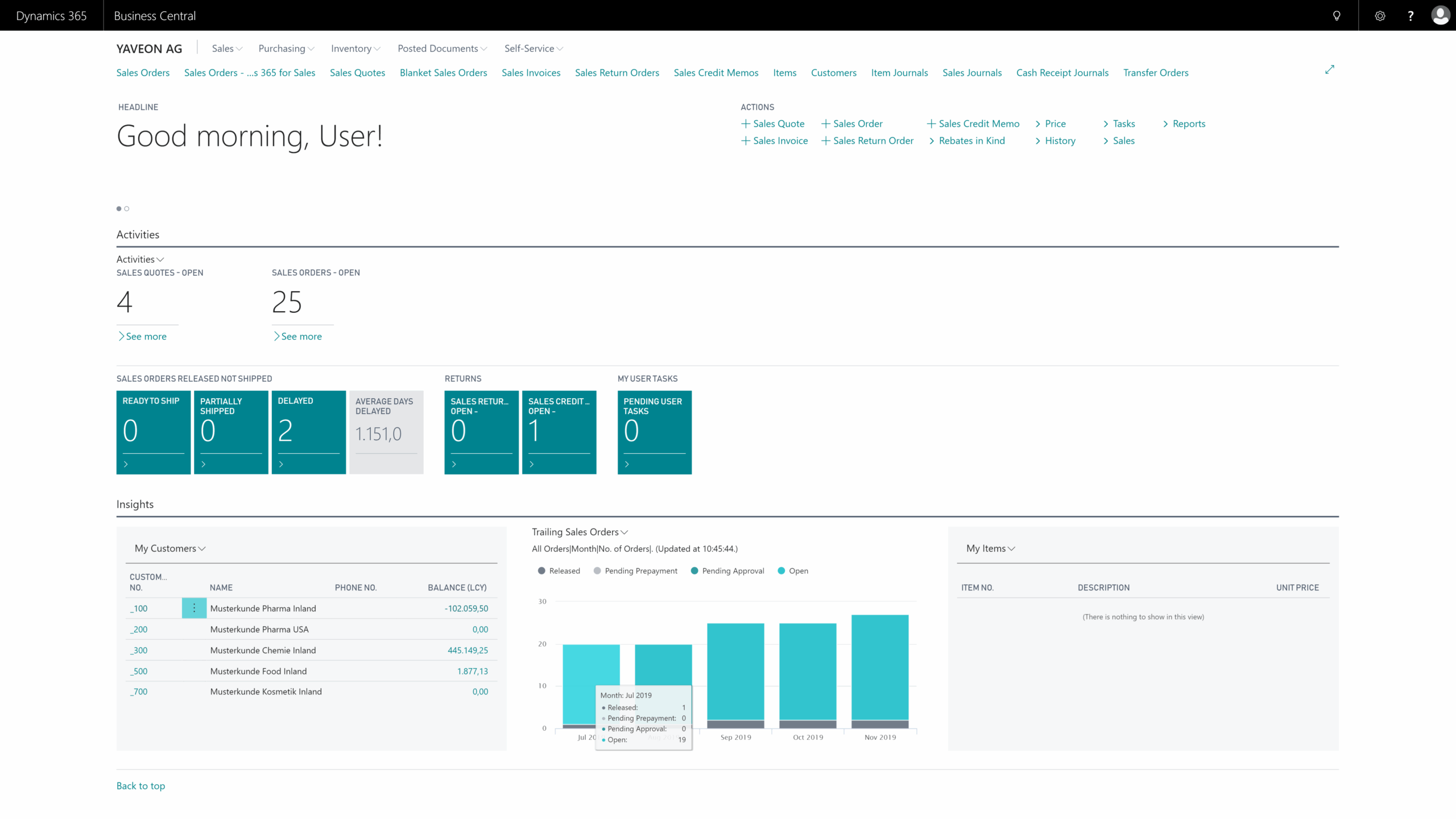
Dynamics 365 Business Central dashboard overview.

Weigh securely

Standardized weighing processes ensure reliable and reproducible results while also meeting regulatory requirements.

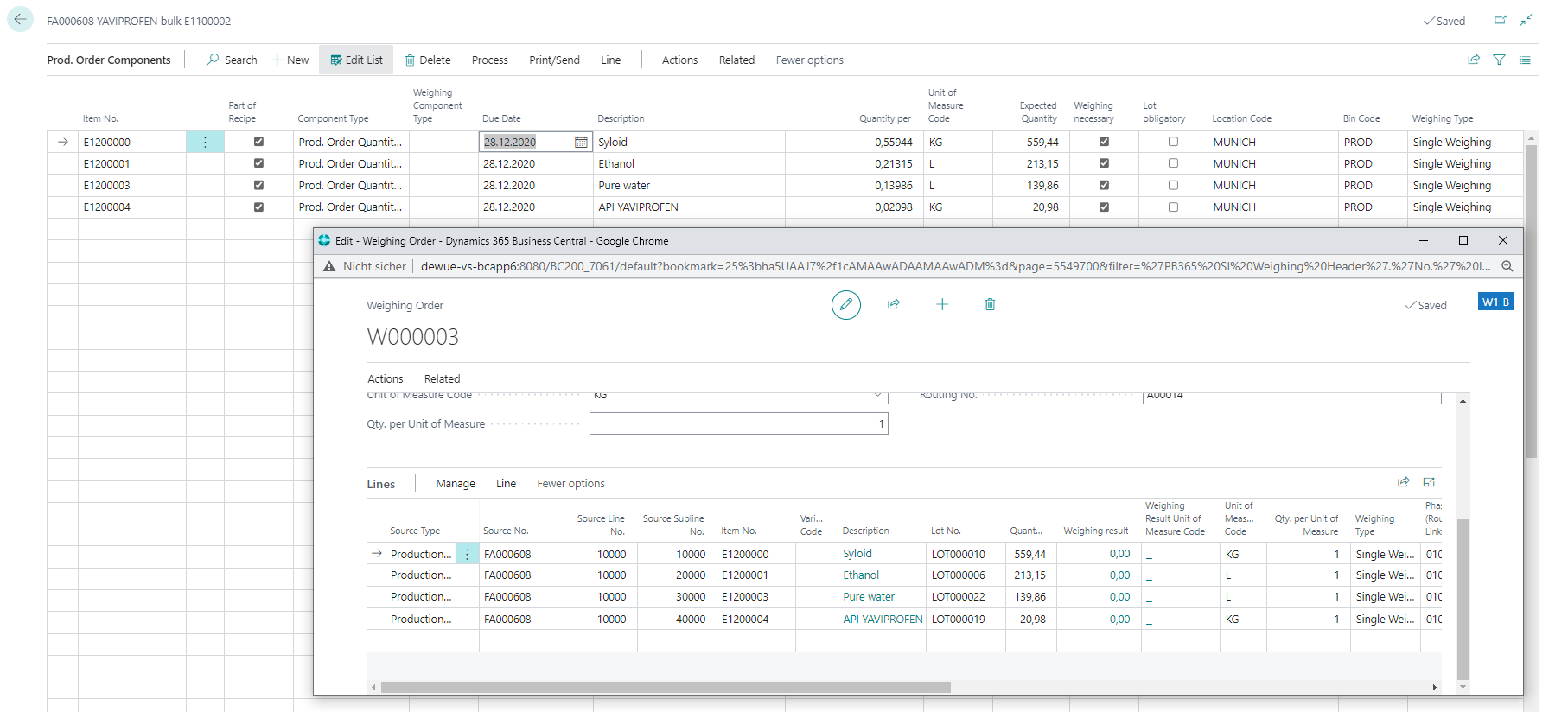
Define weighing tolerances for all or specific items

Weighing tolerance groups available

Create weighing orders directly in Business Central

Supports Mettler Toledo, Sartorius, Minebea, and Bizerba

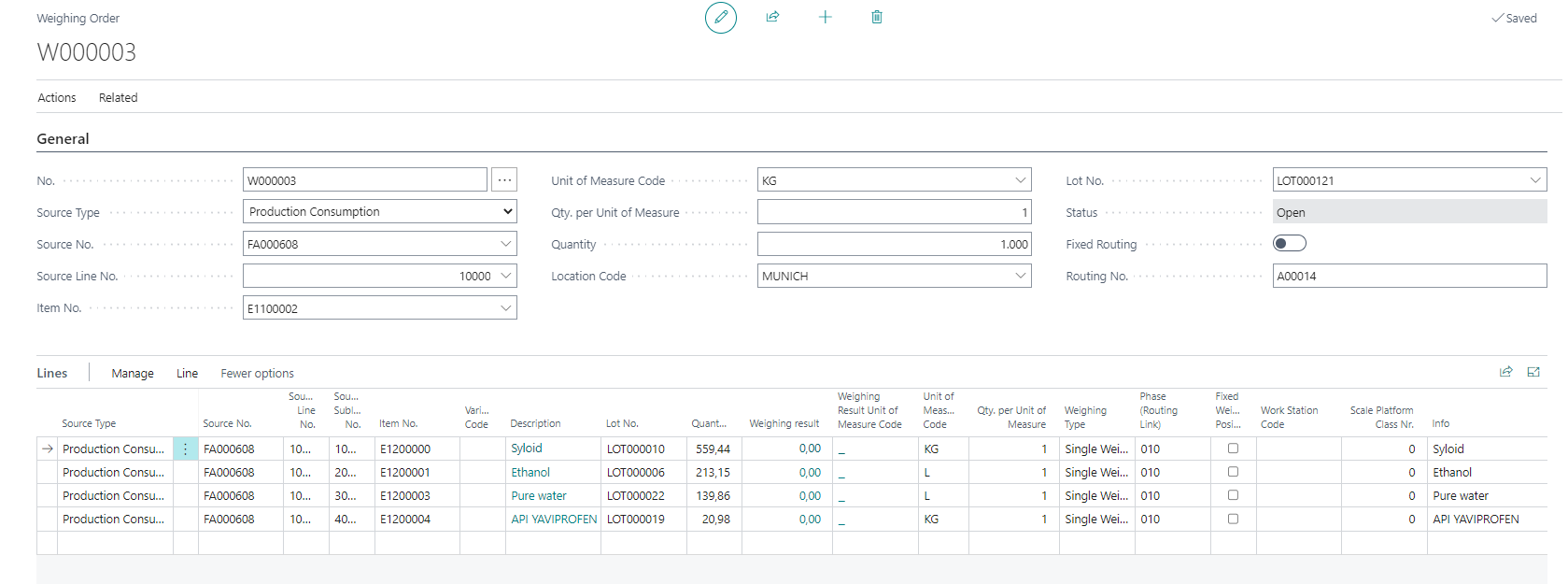
Business Central interface showing production order components and weighing deta

Control access securely and flexibly

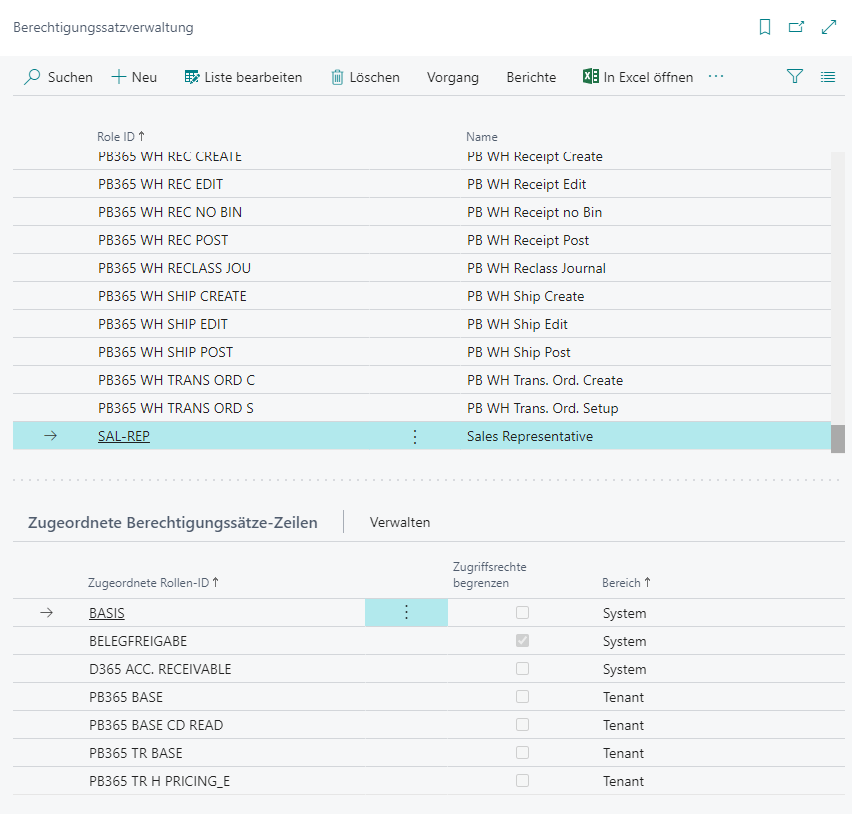
With clearly defined permission sets, you control who has access to which features—ensuring maximum security in your processes.

Automatic provision of permission sets

Define permissions individually

Flexibly adaptable when needed

e.g., basic read rights, rights for creation & editing

User roles and permissions management interface in a software application.

Process automatically

Streamline user interfaces and prevent data loss with automated background processing of tasks.

Automated processing of weighing scale data

Recording communication between the scale and the ERP

Resend records

The functionality of weighing scales is always visible

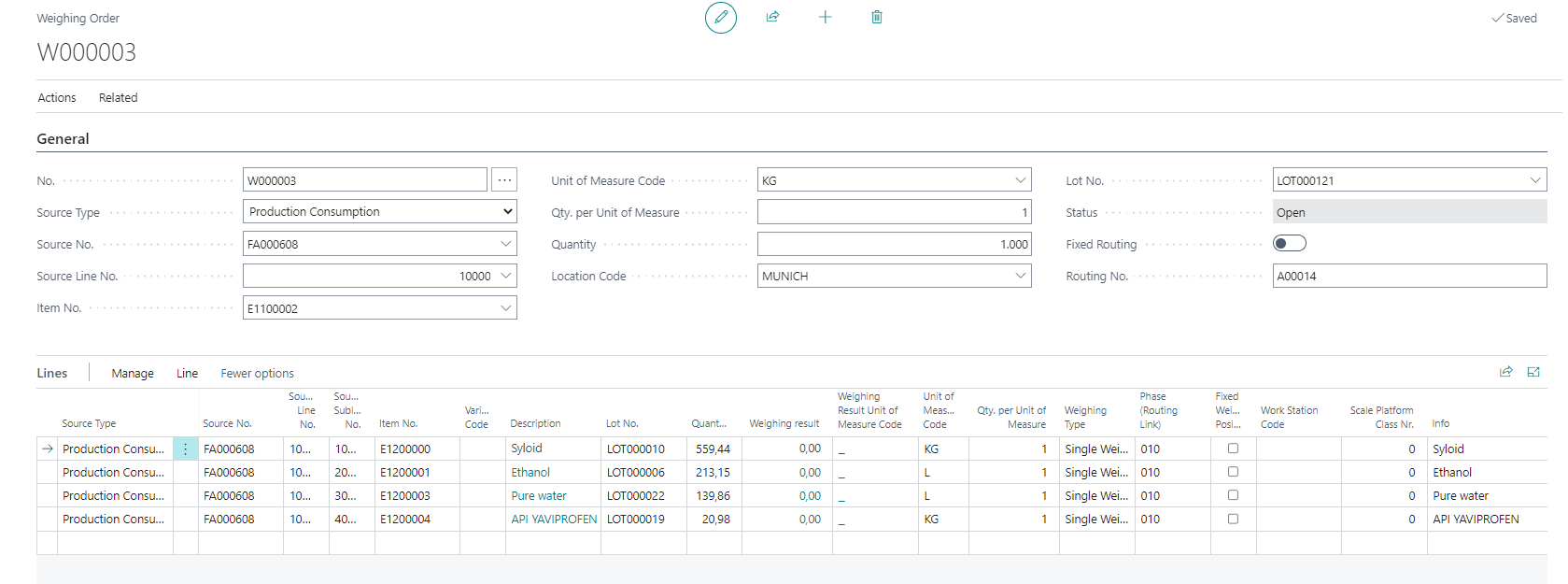
Weighing order interface with inventory details.

Intuitive dialogs for accurate input

Greater clarity and fewer errors through visually supported dialogues with real-time data and integrated tolerance checks.

Graphically supported dialogs

Real-time weight information

Visual booking overview

Inspection mechanisms for tolerances

Dynamics 365 Business Central dashboard overview.

Integrated weight data into the ERP system

Your weight data is reliably and traceably integrated directly into your ERP system—automatically and securely.

Direct transfer of weight quantity production postings

Support for consumption posting and actual reporting

Consideration of batches & serial numbers during posting

Weighing order interface with item details and quantities.
Mockup of Yaveon Papers

An integrated ERP is crucial for your success.

Yaveon 365 Scale Connect seamlessly integrates with Microsoft Business Central and maximizes its potential when combined with our other apps. Our brochure explains how our unified solutions create opportunities for a reliable and future-proof production.
Icon Yaveon Favicon
Quote Icon
We are pleased to have found in Yaveon a convincing partner at eye level who speaks our language.
– Alexander Böhler, Schulz Farben & Lacke
Quote Icon
Yaveon was already the best partner I could have imagined in my very first ERP project.
– Shami Kaur Bola, evident ingredients
Quote Icon
We now have much better visibility of inventory levels, open purchase orders, and sales orders than before.
– Torsten Seck, AQUANOVA AG
Quote Icon
When it comes to ERP implementation, consulting, and support, only praise. There was nothing at all to complain about.
– Andreas Schonert, CTL Europe
Quote Icon
From the very first moment, it was clear that the consultants at Yaveon know validation inside and out.
– Petra Duchrau, Ayanda GmbH

Frequently asked questions about Yaveon 365 Scale Connect:

Which types of scales are integrated with Yaveon 365 Scale Connect?

You integrate weighing scale types such as Mettler Toledo, Sartorius, Minebea, and Bizerba.

Does Yaveon 365 Scale Connect support the integration of multiple weighing scales simultaneously?

Yes, it is possible to integrate as many weighing scales as needed.

Is the weighing scale integration suitable for specific process requirements?

Yes, Yaveon 365 Scale Connect is specifically designed for the needs of the process manufacturing industry and offers flexible application options.

What benefits does Yaveon 365 Scale Connect offer compared to manual weighing processes?

The key benefits are:

  • Secure processes: Creating weighing orders in Business Central ensures centralized and systematic integration of weighing processes and their status monitoring.
  • Efficient operations: All information, including hazardous substances data, is displayed directly in the dialog, providing clarity and security.
  • Intuitive operation: Optimized, graphically-supported dialogs provide everything needed at the scale. Important information, such as hazardous substance symbols, is directly in the user's line of sight.
Is there a way to log and trace weighing operations?

The app enables the creation of weighing orders directly in Business Central, allowing centralized and systematic integration of weighing processes and their status monitoring. This supports the documentation and tracking of weighing operations.

How does weighing scale integration ensure data quality and security?

The interface communication is transparently logged. Transmission follows the latest standards for secure communication via a web service.

Trends, tips & events:
current insights

Success story: Helm Success story: Helm – Beitrag öffnen
Success story: Helm

HELM saves time, simplifies work and automatically books consumption with Yaveon solutions.

Success story: Gustav Heess Success story: Gustav Heess – Beitrag öffnen
Success story: Gustav Heess

gustav heess accelerates its ability to respond to the challenges of globalization with Yaveon ERP.

Success story: Ayanda Success story: Ayanda – Beitrag öffnen
Success story: Ayanda

Ayanda implements an ERP system that meets computer system validation requirements and supports further optimization.

Yaveon Favicon
More than 850 companies trust Yaveon as their ERP partner of choice
Yaveon Favicon
crosschevron-down