AI in ERP for process manufacturers: Ensure quality, simplify routine work. Watch the webinar now!
yaveon favicon bildmarke
Icon weiße Lupe

Enhance complaint management in Business Central

With Yaveon 365 Incident Management, you turn complaints and incidents into opportunities for increased efficiency.

Respond quickly: Handle complaint incidents promptly

Seamlessly review: Integrated monitoring of supply chain issues

Centralized recording: management of quality assurance measures

Rotes Warnsymbol mit Ausrufezeichen auf einem digitalen Bildschirm.

More than 1000 companies worldwide rely on Yaveon

HOSTA GmbH & Co. KG logo
Kundenlogo Midas Pharma GmbH
Kundenlogo Sanity Group GmbH
Kundenlogo DR.SCHNELL GmbH & Co. KGaA
Kundenlogo frei öl
Kundenlogo RAVENOL

How our complaint management ensures safety & quality .

Maintain process reliability in focus

Monitor product and process quality and track error management. By recording the implementation of corrective and preventive actions, you are prepared for quality audits.

Everything in one place

Capture, document, and process complaints or incidents in Microsoft Business Central—from the initial report to the final action.

Save time

The system automatically transfers all relevant data such as items, serial numbers, and batch numbers directly from the source document to the incident document, reducing your effort.

Satisfied customers and suppliers

With Yaveon 365 Incident Management, after assessment, you can directly create complaints or credit notes as needed to strengthen the trustful cooperation with customers and suppliers.

Systematically and seamlessly manage deviations.

Yaveon 365 Incident Management integrates seamlessly with Microsoft Business Central and can be combined with additional apps. This ensures continuous processes for the efficient handling of incidents and maintaining high quality, building trust and sustainably strengthening your business.

Key features for complaint management
 in Microsoft Business Central

Processes
Documents
Data initialization
Authorization sets
Analysis

Handle incidents in a structured manner

Keep track of complaints and incidents – transparently, documented, and efficiently.

Analyze complaints and incidents

Edit centrally in the system

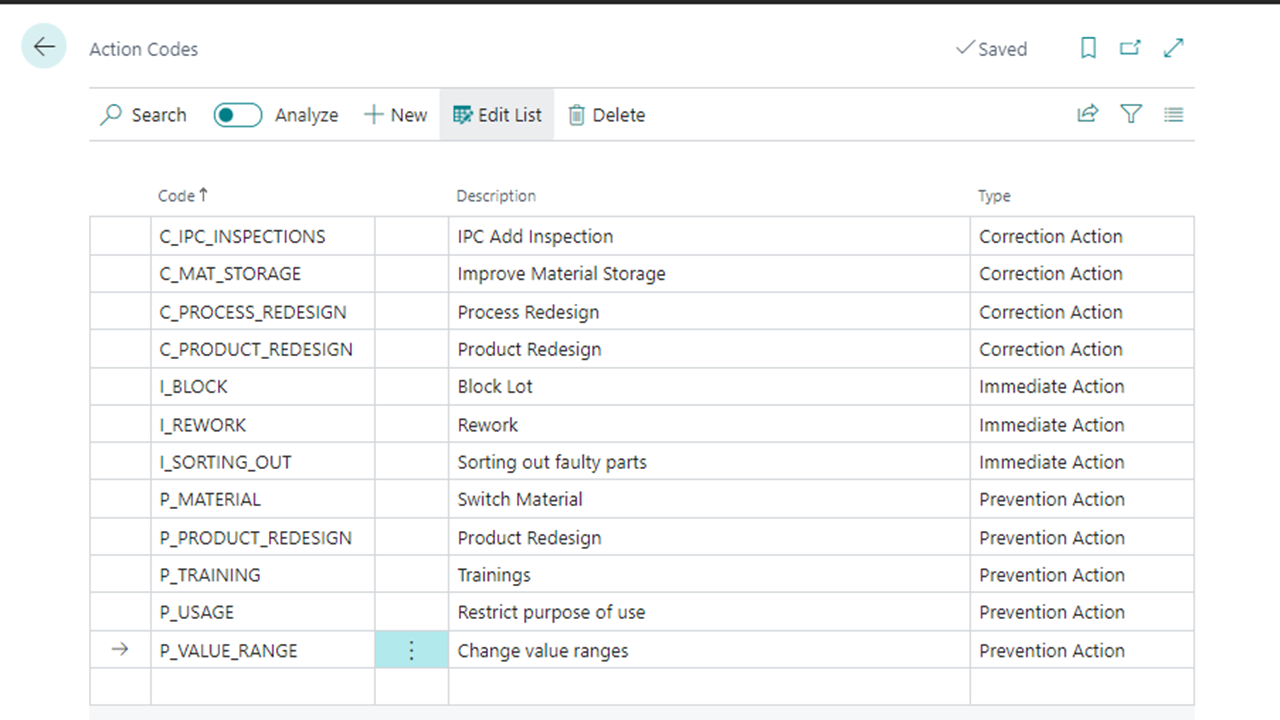
Define actions

Monitoring production process deviations

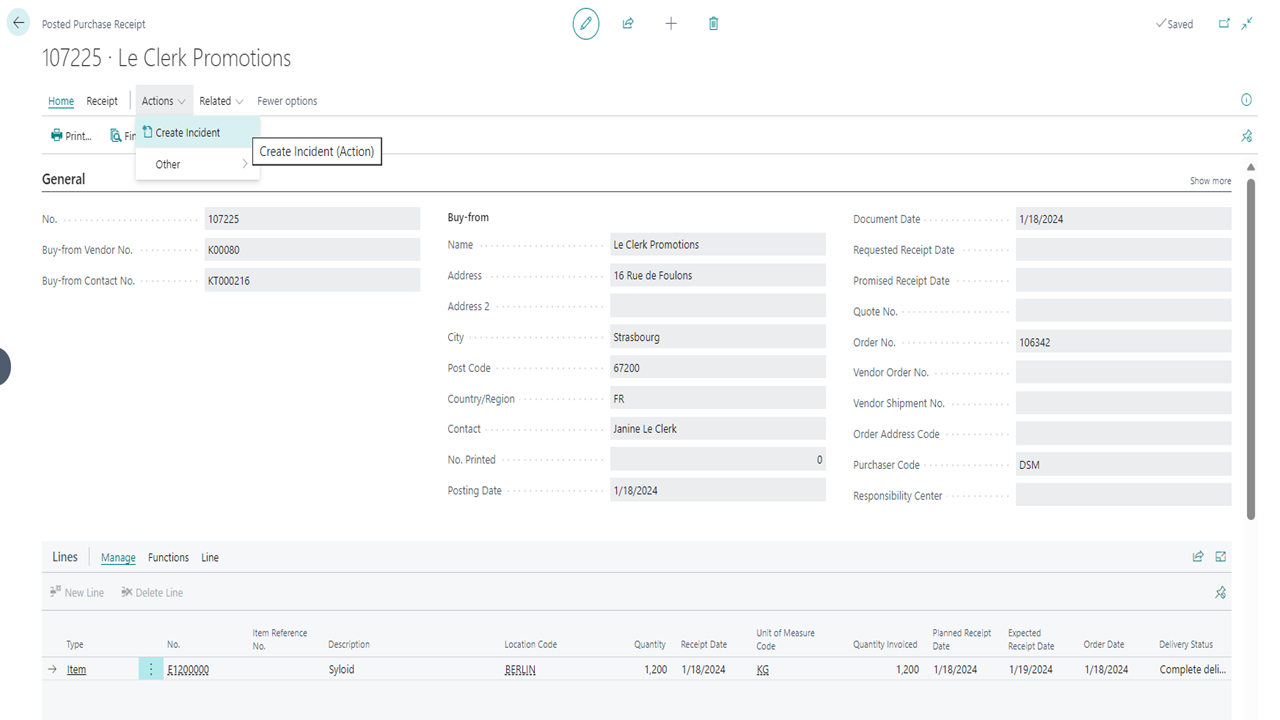
Purchase receipt details for Le Clerk Promotions in an ERP system.

Capture documents on-site directly

Capture deviations immediately, right where they occur—whether internally or caused by third parties.

Message from customer or supplier

Internally identified issue 

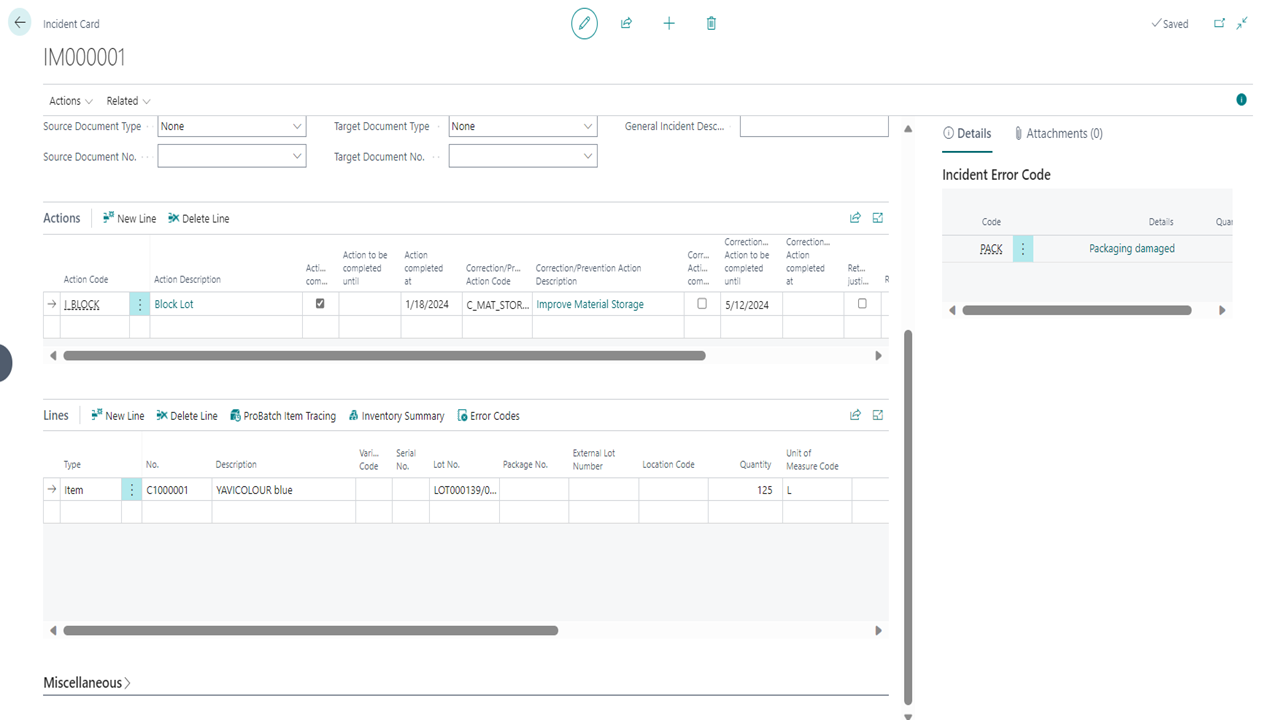
Import of item and batch data from source documents

Generate complaints or credit notes

Incident Card with details of a packaging issue

Ready to use

The Incident Management App allows you to get started right away. Everything you need for productive use is already built-in.

Comprehensive initialization as a foundation

Creating number series

Creating permission sets

Table listing action codes with descriptions and types.

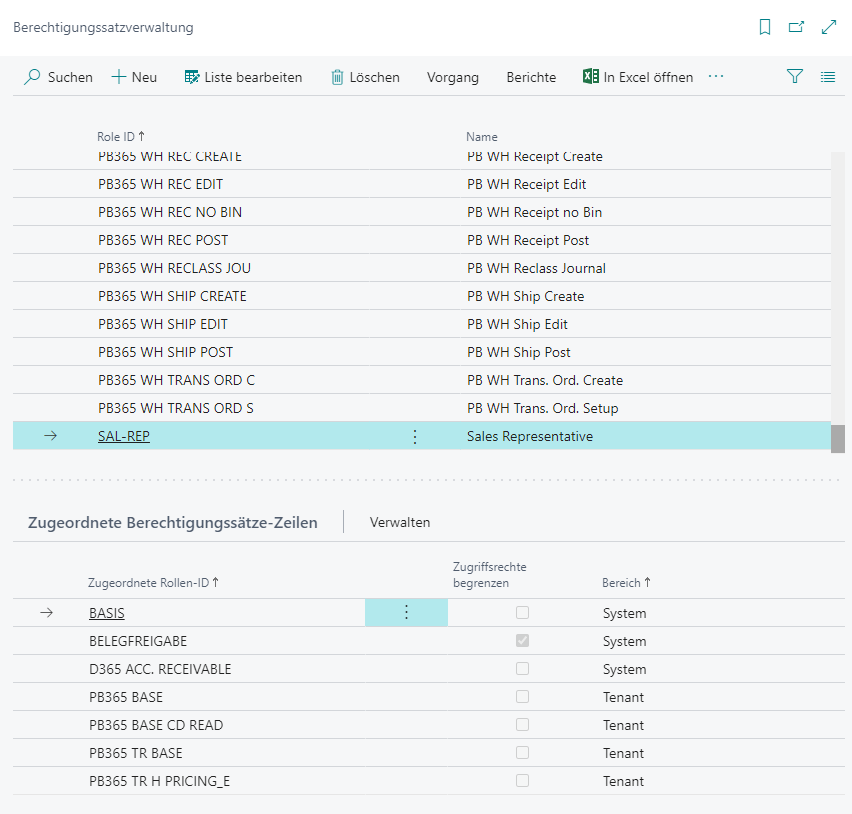
Secure rights management

Individually determine who has which permissions. This keeps your processes transparent and your data protected.

Automatic installation

Configure incident types, causes, and more

Read Documents

Create, edit & delete documents

Role management interface with user permissions in a software system.

All in view

An intuitive interface and quick access make the Role Center the perfect control hub for your incident management.

Creating new incident documents

Overview of Existing Incident Documents

Quick access to setup tables

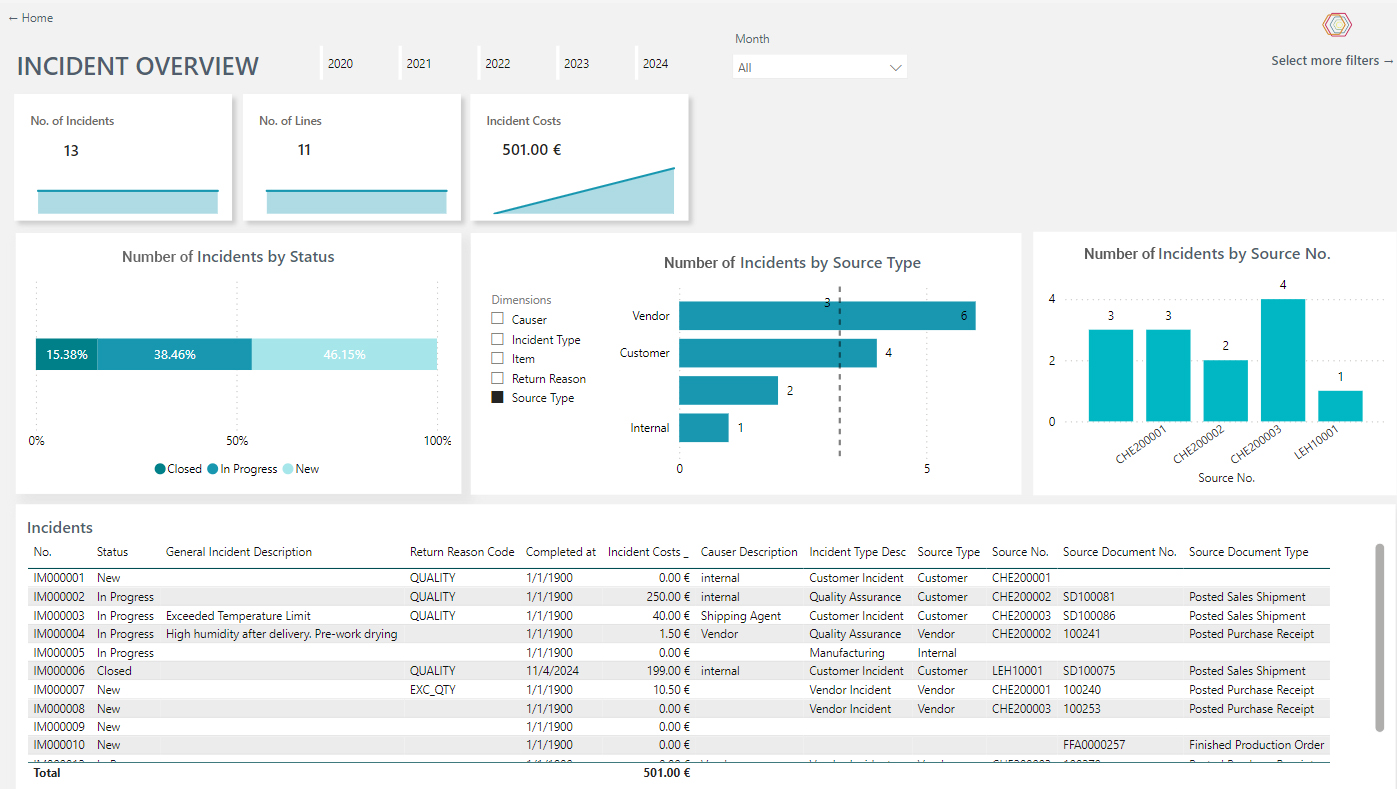
The standard cockpit in Power BI consolidates information

Incident overview dashboard with charts and statistics.
Mockup Yaveon 365 Incident Management App Factsheet

Identify incidents, eliminate causes

The Incident Management app is part of Yaveon 365 and centrally records deviations and incidents, analyzes causes, and tracks actions. Teams respond faster and prevent errors from recurring. The factsheet shows how clear responsibilities, transparent actions, and consistent follow-up help safeguard quality across your organization.
Icon Yaveon Favicon
Quote Icon
We are pleased to have found in Yaveon a convincing partner at eye level who speaks our language.
– Alexander Böhler, Schulz Farben & Lacke
Quote Icon
Yaveon was already the best partner I could have imagined in my very first ERP project.
– Shami Kaur Bola, evident ingredients
Quote Icon
We now have much better visibility of inventory levels, open purchase orders, and sales orders than before.
– Torsten Seck, AQUANOVA AG
Quote Icon
You can truly say that the ERP system is very good. We are very satisfied.
– Kevin Urbaum, Sanity Group
Quote Icon
When it comes to ERP implementation, consulting, and support, only praise. There was nothing at all to complain about.
– Andreas Schonert, CTL Europe
Quote Icon
From the very first moment, it was clear that the consultants at Yaveon know validation inside and out.
– Petra Duchrau, Sirio Pharma Germany

Frequently asked questions about Yaveon 365 Incident Management:

How is Yaveon 365 Incident Management installed?

Installing Yaveon 365 Incident Management takes just a few steps. First, open the extensions management in your Business Central and select AppSource. Here, you'll find an overview of available apps. Choose the desired app and click on "Free Trial." After a brief confirmation, the installation page will open – click "install" and the app will be installed.

Alternatively, you can open AppSource in your browser, sign in with your Microsoft account, and select the desired app. Then, click on "Free Trial," choose your desired environment, and follow the same installation steps as from within Business Central.

What does Yaveon 365 Incident Management cost?

The price for Yaveon 365 Incident Management varies based on the number of users. The tiers are ten, 25, 50, and more than 75 users. For more detailed information, feel free to contact us. 

In which countries is Yaveon 365 Incident Management available?

Thanks to our extensive partner network, our apps are available (almost) worldwide.

How is payment handled for Yaveon 365 Incident Management?

You can choose between annual or monthly payments.

Is there an online help available?

Yes, an online help is available for every app.

Trends, tips & events:
current insights

The digital potential of the process industry The digital potential of the process industry – Beitrag öffnen
The digital potential of the process industry

We show you how the process industry can unleash its greatest digital potential with 5 practical use cases.

Audit trail & electronic signatures Audit trail & electronic signatures – Beitrag öffnen
Audit trail & electronic signatures

Find out how you can regulate audit trails & electronic signatures and comply with FDA 21 CFR Part 11.

What is part of quality assurance? What is part of quality assurance? – Beitrag öffnen
What is part of quality assurance?

With quality assurance, companies ensure that the quality of their products and services remains consistently high.


Yaveon Favicon
More than 1000 companies trust Yaveon as their ERP partner of choice
Yaveon Favicon
chevron-down