Yaveon 365 is a leading industry ERP for the process manufacturing industry, delivering full visibility and real value.



Innovation: visionary progress with cutting-edge solutions
Integration: unites systems, AI, and partner solutions in one ecosystem
Quality: Business Central is one of the leading ERP systems for SMEs

Enhance process efficiency with copilot and workflows
Strategically manage finances & resources for sustainable success
Identify sales opportunities & strategically increase revenue
Plan projects more profitably and complete them successfully

Visualize data with AI and analytics tools for strategic decision-making
Share insights centrally in tools like Teams or Excel and use them productively
Secure Processes with Microsoft Governance & Compliance
Insights into daily applications to identify areas for action

Power Apps: Build apps and workflows without additional coding
Power Automate: Enhance productivity through process automation
Power Virtual Agents: Chatbots for Customers & Teams
Dataverse: Central, Unified Data Foundation for Enterprises

Automated tasks and text-based suggestions using AI-driven prompts
More efficient email responses with intelligent suggestions
Save time by automating complex manual processes
Direct creation of sales orders from files in Business Central

360° Customer View for Targeted, Customer-Focused Actions
Monitor leads and opportunities for optimal sales processes
Achieve Marketing Success with Campaign Management
Enhanced customer service through a centralized ticketing and knowledge database & automation

Office Apps: Always up-to-date with Word, Excel, and PowerPoint
Teams: Centralized communication & collaboration
OneDrive & SharePoint: secure cloud storage
Copilot: AI support included

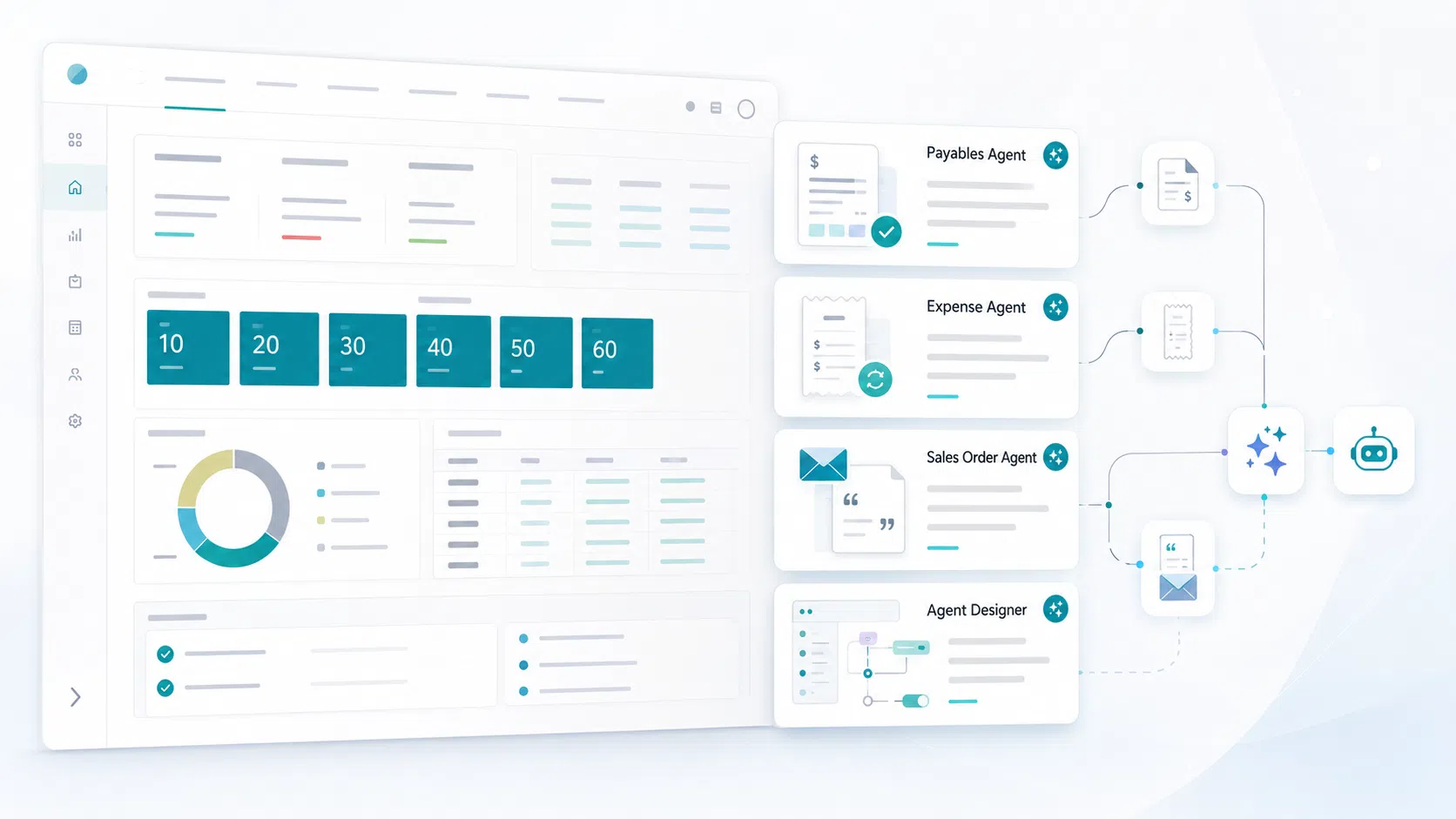
Invoices from your inbox
The Payables Agent prepares incoming invoices for processing. You only take care of the final review – the decision remains entirely yours.
Process expenses intelligently
The Expense Agent automates the handling of travel expenses and receipts, helping teams reduce manual work in day-to-day expense processes.
Prepare quotes automatically
The Sales Order Agent turns email inquiries into clear quotes and converts them directly into sales orders once they are approved.
Build your own agents without code
Simply tell the designer in natural language what the agent should do and create custom agents without programming skills.
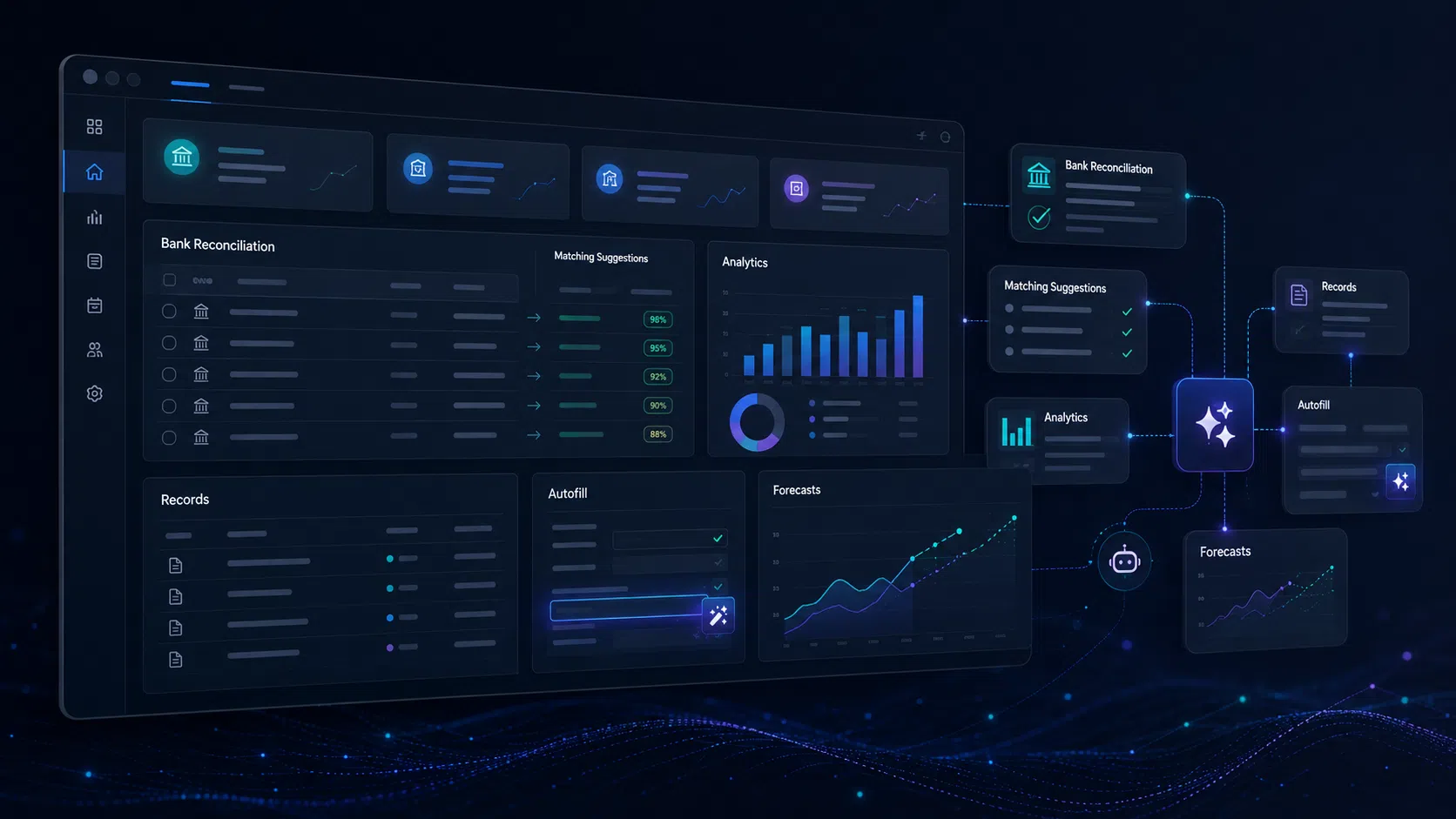
Match bank transactions
Copilot intelligently connects bank statements with the general ledger and recommends suitable G/L accounts for open items.
Analyze data directly in the system
Create analyses from lists using natural language – with grouping, filtering and summarization directly in Business Central.
Records summarized to the point
Copilot condenses records into precise key insights and displays the most relevant information directly next to your data.
Have fields suggested automatically
Autofill uses data and patterns to suggest suitable field values when creating and editing documents in Business Central.
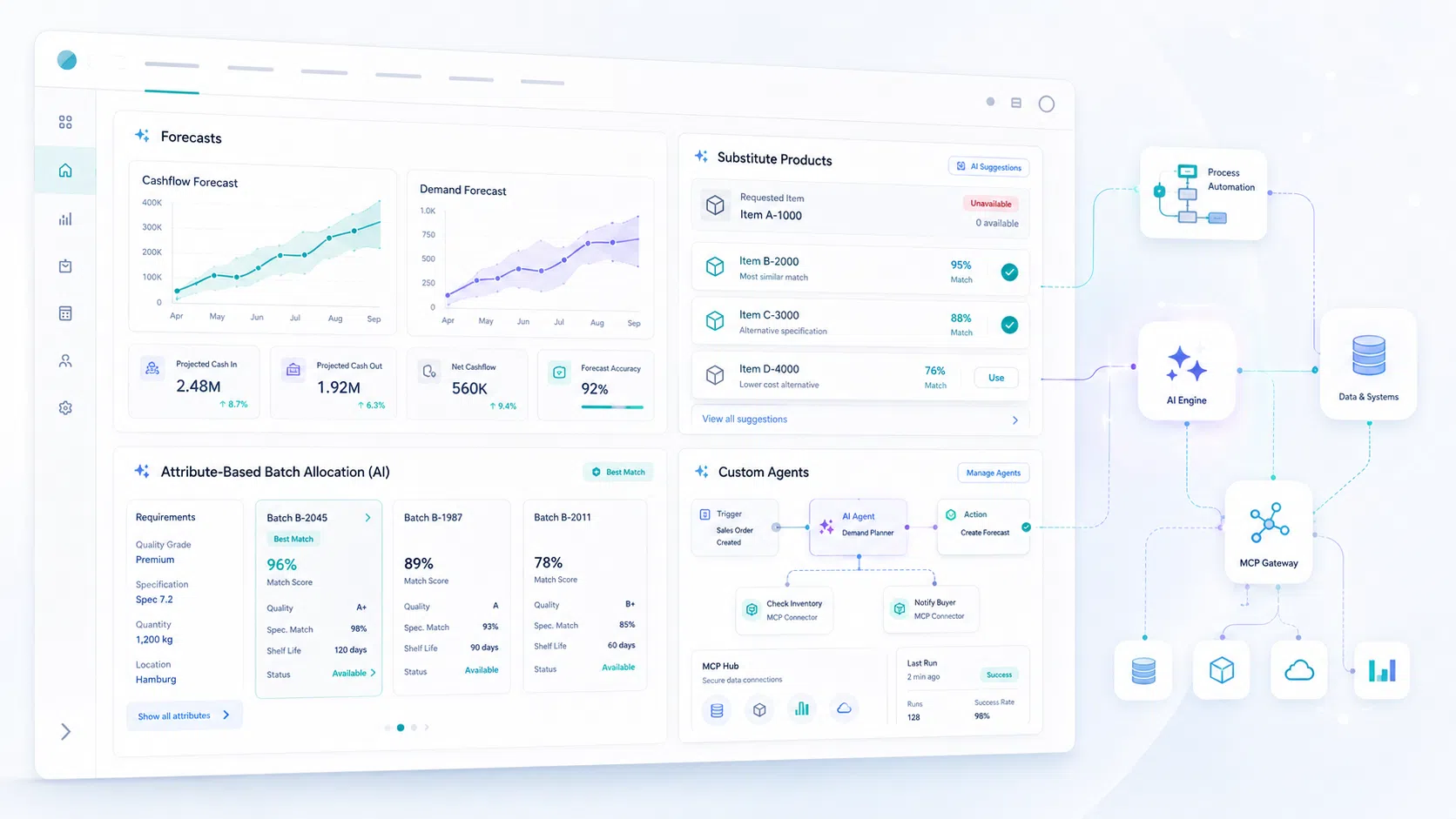
View cash flow, payment behavior and demand
Business Central uses AI to evaluate your data and provide precise forecasts for liquidity, payment delays and demand planning.
Suggest suitable alternatives
If products are unavailable, Copilot provides suitable alternatives. This helps you create quotes seamlessly and process orders without delays.
AI-based batch allocation using item features
Copilot in Yaveon 365 selects batches based on defined item features and rules – supporting sound decisions in quality-critical and process-critical workflows.
AI automation beyond the standard
With a connection to an MCP server, the Microsoft platform opens up new automation options that go far beyond the standard scope.
Microsoft Dynamics 365 Business Central becomes the ideal ERP system for the process manufacturing industry with the Yaveon industry-specific ERP solution. We add field-tested features for regulated environments and leverage over 15 years of industry experience. The result? Unbeatable.
Enhancements for regulated industries, from batches to compliance
Lot tracking, recipe management, quality management
Suitable for computer system validation in the cloud
Meets regulatory requirements (e.g., GxP, IFS, FDA)

Pre-built dashboards for finance, production, procurement, and sales
Specifically tailored to the process manufacturing industry
Direct connection to Microsoft Dynamics 365 Business Central
Real-time evaluations, no more manual reports

Microsoft offers a diverse ecosystem characterized by seamlessly integrated tools, top-notch security standards, and continuous innovation. This globally recognized platform is future-proof and provides a solid foundation for scalable and efficient processes in your company.
Microsoft offers a unique ecosystem that we strategically expand and customize. With Business Central, we rely on one of the leading ERP systems for SMEs. At Yaveon, we develop the perfect solution for the process manufacturing industry from this – tailor-made, efficiently optimized, and fully integrated. This enhances your productivity and prepares you optimally for future challenges.
Yaveon enhances Microsoft Dynamics 365 Business Central with features like formula management, lot tracking, and compliance, specifically tailored for regulated industries. Complemented by Power BI dashboards and ProDocs document management—all seamlessly integrated into the Microsoft ecosystem.
Yaveon solutions are fully integrated into the Business Central user interface. Work in a seamless environment without media disruptions or additional systems.
You receive a future-proof solution that meets industry-specific requirements while leveraging all the benefits of the Microsoft ecosystem—ranging from user-friendliness and cloud capability to integration with Microsoft 365, Teams, and Power Platform.
Microsoft continuously invests in the development of Business Central and the entire Dynamics 365 platform. As a globally established provider, Microsoft offers long-term stability, regular updates, and modern technologies such as AI and automation.
The modular structure of Business Central and the expandability of the Yaveon solution ensure that your ERP system remains flexible, whether for new processes, additional locations, or increasing regulatory requirements.
 Yaveon 365: The ERP for the process industry – Beitrag öffnen
Yaveon 365 is a leading industry ERP for the process manufacturing industry, delivering full visibility and real value.
Our guide for Microsoft Appsource – Beitrag öffnen
What is Microsoft AppSource, what apps are available there, and how much do they cost? We explain.
 Product News – Beitrag öffnen
The latest product news for Yaveon 365 highlights new features and updates that make the industry-specific ERP solution even better.